


BLOG
本文作者 Eric Provencher,在 OpenAI 负责 Codex 开发者体验(DX),此前是 Repo Prompt 的作者。原文是 OpenAI 官方文档中的 Prompting 指南,以下为逐段中英对照翻译
learn.chatgpt.com/docs/prompting
Prompting 概述
Prompting is how you tell ChatGPT what you want to know, make, or change. A prompt can be a question, an instruction, or a goal. You don’t need technical syntax or a rigid formula. Start in your own words, review the response, and use follow-up messages to shape the result.
Prompt 就是你告诉 ChatGPT 你想知道什么、想做什么、想改什么。它可以是一个问题、一条指令,或者一个目标。你不需要技术语法,也不需要固定套路。用自己的话开头,看看回复,再用后续消息把结果修成你要的样子
A short prompt is often enough. For larger or more important tasks, include the parts that matter:
一句短 prompt 往往就够了。任务更大或更重要时,把关键的几块信息带上:
Goal: What should ChatGPT do?
目标(Goal):ChatGPT 该做什么?
Context: What information or sources will help?
上下文(Context):哪些信息或来源能帮上忙?
Output: What format, length, or level of detail do you need?
输出(Output):你需要什么格式、多长、多细?
Boundaries: What must stay unchanged? What should ChatGPT avoid or check with you before it acts?
边界(Boundaries):哪些东西不能动?哪些事 ChatGPT 该避开,或者动手前先来问你?
Use only the parts that help. You don’t need to fill in every item or follow a required format.
只用对你有帮助的部分就行。不需要每一项都填,也没有什么必须遵守的格式
描述你要的结果
Start with the result, not a detailed list of steps. Include the audience or format when those details change what ChatGPT should produce.
从结果说起,不要从一长串步骤说起。当受众或格式会影响产出时,把它们写进去
Turn these meeting notes into a short update for the project team.Put the decisions and next steps first.
把这些会议记录整理成一份给项目组的简短进展通报。决策和下一步行动放在最前面
This prompt explains what to create and who will read it. Describe a process when the process itself matters. Otherwise, leave ChatGPT room to search, compare information, and adjust its approach.
这条 prompt 说清了要产出什么、给谁看。只有当过程本身重要时,才去描述过程。其他时候,给 ChatGPT 留出空间,让它自己去搜索、比对信息、调整做法
补充有用的上下文
Share the information that could change the result. Add only the sources that matter, and explain what ChatGPT should take from each one.
把可能改变结果的信息给它。只加真正相关的来源,并且说明每个来源里 ChatGPT 该取什么
Attach documents, spreadsheets, presentations, or PDF files when you want ChatGPT to summarize, compare, transform, or create files for review.
想让 ChatGPT 总结、比对、转换内容,或者生成待审阅的文件时,附上文档、电子表格、演示文稿或 PDF
Add a screenshot, diagram, or other image input when the task depends on visual context. Point out the area that matters instead of relying on the image alone.
任务依赖视觉信息时,加一张截图、示意图或其他图片输入。指出图里关键的区域,不要只把图丢过去
Ask ChatGPT to use web search when the answer depends on current information, and ask for sources when you need to check the result.
答案依赖最新信息时,让 ChatGPT 用网页搜索。需要核对结果时,让它给出来源
Use a project when related chats or tasks should share files, sources, or a local folder.
相关的对话或任务需要共享文件、来源或本地文件夹时,用 project 来组织
使用已连接的数据源
When ChatGPT has access to connected sources, name where it should look and what it should find. You don’t need to describe every search it should run.
当 ChatGPT 能访问已连接的数据源时,点名它该去哪找、找什么。不需要把每一次检索都描述出来
Use the latest project plan in Drive and relevant decisions and updates from the project’s Slack channel to prepare a status update.
用 Drive 里最新的项目计划,加上项目 Slack 频道里相关的决策和进展,准备一份状态通报
Connected sources require the matching plugin, and availability can depend on your plan and workspace settings.
已连接的数据源需要对应的插件,能不能用还取决于你的订阅方案和工作区设置
使用插件
Plugins give ChatGPT reusable instructions and connections to tools such as Google Drive, Gmail, Slack, and GitHub. Ask for the result you need and let ChatGPT choose from the tools available to it. To choose a specific plugin, type @ in the composer.
插件给 ChatGPT 提供可复用的指令,以及到 Google Drive、Gmail、Slack、GitHub 这类工具的连接。直接说你要的结果,让 ChatGPT 从可用的工具里自己挑。想指定某个插件,在输入框里输入 @
个性化 ChatGPT
Put preferences that should apply across chats and tasks in Settings > Personalization as custom instructions. Keep details that matter only to the current task in the prompt.
需要在所有对话和任务里生效的偏好,放进「设置 > 个性化」的自定义指令。只对当前任务有用的细节,写在 prompt 里
设定能防住真麻烦的边界
Boundaries are the few instructions ChatGPT needs to avoid creating extra work or taking an action you didn’t intend. Add one when changing the wrong detail would make the result unusable, or when you want to review something before it affects other people.
边界是那么几条指令,用来防止 ChatGPT 制造额外的工作,或者做出你没打算让它做的动作。什么时候加?改错一个细节结果就没法用的时候,或者某件事影响到别人之前你想先过目的时候
Keep the approved dates and budget figures unchanged.
已批准的日期和预算数字保持不动
Use only the supplied sources. Flag missing information instead of guessing.
只用我提供的来源。信息缺了就标出来,不要猜
Keep recommendations within the stated budget.
建议控制在说好的预算之内
Prepare the message as a draft. Don’t send it.
把消息准备成草稿,不要发出去
Focus on the one or two boundaries that matter most. You don’t need to control every step ChatGPT takes.
盯住最要紧的一两条边界就好。不需要控制 ChatGPT 走的每一步
让结果拿来就能用
Tell ChatGPT how you plan to use the result. This helps it choose the right length, level of detail, and organization.
告诉 ChatGPT 你打算怎么用这个结果。它就能选对长度、详细程度和组织方式
Make this a one-page summary a director can scan before the meeting. Put the decision and next steps first.
做成一页纸的摘要,让总监开会前扫一眼就行。决策和下一步放最前面
Turn these notes into a follow-up email with the decisions, owners, and due dates.
把这些笔记整理成一封跟进邮件,写清决策、负责人和截止日期
Create a clear table of planned versus actual spending and highlight any difference over 10%.
做一张计划支出和实际支出的对照表,差异超过 10% 的都标出来
For important work, ask ChatGPT for a final check, such as confirming every action item has an owner and due date or flagging information it couldn’t verify. Then review the result yourself before you use or share it.
重要的工作,让 ChatGPT 收尾时做一次终检,比如确认每个行动项都有负责人和截止日期,或者把它没法核实的信息标出来。然后你自己再过一遍,再去用、再去分享
用追问改进结果
Your first prompt doesn’t need to be perfect. Review the result, then ask for the specific change you want.
第一条 prompt 不需要完美。看完结果,把你想要的具体改动说出来
Make the opening more direct, keep the evidence, and move the recommendation above the background section.
开头写得更直接一点,证据保留,把建议挪到背景部分的前面
You can add a missing source, correct the direction, ask for another option, or change the level of detail without starting over.
你可以补一个漏掉的来源、纠正方向、再要一个方案,或者调整详细程度,不用从头再来
Steer 与 Queue
When Codex is already working, you can send another message without waiting for the current run to finish:
Codex 干活的时候,你不用等当前这轮跑完,就能发下一条消息:
Steer adds the message to the current run. Use it to change direction, add a missing detail, or share new information.
Steer(转向)把消息加进当前这一轮。用来改方向、补细节、给新信息
Queue saves the message for the next run. Use it for a follow-up that should wait until the current work finishes.
Queue(排队)把消息留到下一轮。适合那些该等当前工作干完再说的追问
In the ChatGPT desktop app, choose the default under Settings > General > Follow-up behavior. Queued messages appear above the composer, where you can edit, reorder, send, or delete them. The setting also shows the shortcut for using the other behavior for one message without changing your default.
在 ChatGPT 桌面应用里,默认行为在「设置 > 通用 > 追问行为」里选。排队中的消息显示在输入框上方,可以编辑、调整顺序、发送或删除。这个设置页还会显示一个快捷键,让你在不改默认的前提下,单条消息临时用另一种行为
In Codex CLI, press Enter while Codex is working to steer the current turn, or press Tab to queue the message for the next turn. See the interactive shortcuts for details.
在 Codex CLI 里,Codex 工作时按 Enter 是 steer 当前这一轮,按 Tab 是把消息 queue 到下一轮。细节见交互快捷键文档
把这些拼在一起
For a project update that uses connected sources, a complete prompt might look like this:
一份用到已连接数据源的项目通报,完整的 prompt 大概长这样:
Prepare a one-page project status update for Monday’s leadership meeting. Use the latest project plan in Drive and relevant decisions and updates from the project’s Slack channel.Lead with the decisions leadership needs to make and the next steps. Summarize progress, risks, owners, and due dates. Keep approved dates and budget figures unchanged. Flag any conflicting or missing information, and don’t send or publish anything.Before you finish, check that every next step has an owner and due date.
为周一的管理层会议准备一份一页纸的项目状态通报。用 Drive 里最新的项目计划,加上项目 Slack 频道里相关的决策和进展。管理层需要拍板的决策和下一步行动放在最前面。总结进度、风险、负责人和截止日期。已批准的日期和预算数字保持不动。有冲突或缺失的信息就标出来,任何东西都不要发送或发布。收尾前,检查每个下一步都有负责人和截止日期
This prompt covers the Goal, Context, Output, and Boundaries, then asks for a final check without spelling out every step.
这条 prompt 覆盖了目标、上下文、输出和边界,最后要了一次终检,但没有把每一步都写死
使用语音听写
In the ChatGPT desktop app, hold Ctrl+M while the composer is visible, then start talking. ChatGPT transcribes your speech into the composer so you can review and edit it before sending the prompt.
在 ChatGPT 桌面应用里,输入框可见时按住 Ctrl+M,然后开口说话。ChatGPT 会把你说的话转写进输入框,发送前可以检查和修改
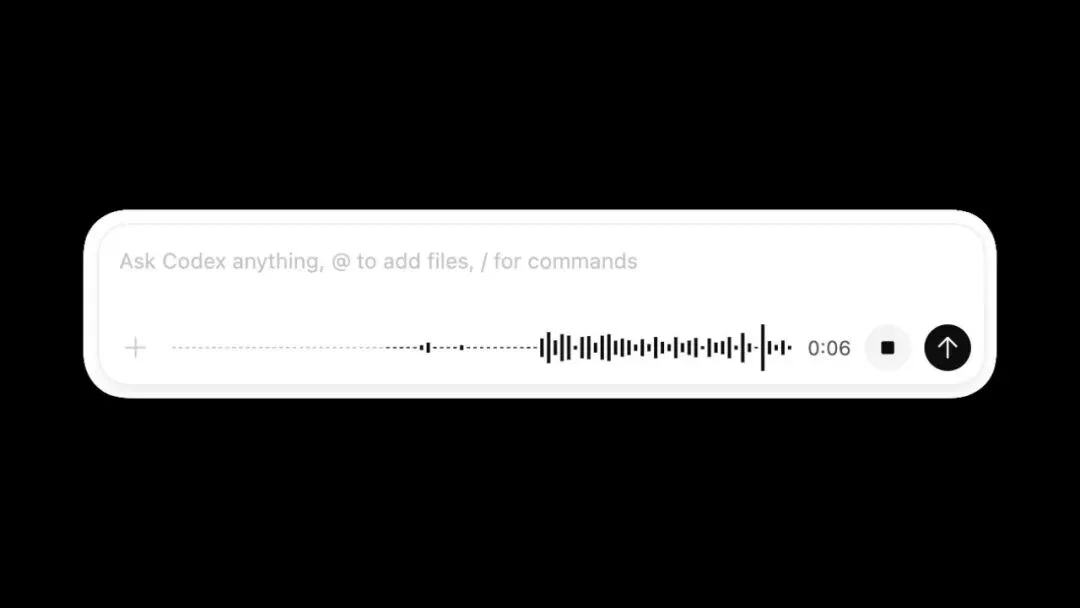
输入框里的语音听写指示条,转写好的 prompt 就在里面
Chat 的 prompt 示例
Use Chat for questions, ideas, drafts, and everyday decisions. Start with the outcome you want, then add detail only when it changes the answer.
Chat 适合提问、找点子、打草稿和日常决策。从你想要的结果说起,细节只在它会改变答案的时候再加
理解一个话题
Explain how compound interest works for someone who has never invested.Use one concrete example and define any financial terms you introduce.
给一个从没投资过的人解释复利是怎么回事。用一个具体的例子,你引入的金融术语都要给出定义
起草和打磨文字
Draft a friendly email declining this invitation because I will be traveling.Keep it under 120 words and leave the door open for a future event.
起草一封友好的邮件,婉拒这个邀请,理由是我届时在外出差。控制在 120 词以内,给以后的活动留个口子
比较选项
Compare these two phone plans for one person who travels internationally twice a year. Show the important differences in a table, then recommend one and explain the tradeoff.
帮一个每年出国两次的人比较这两个手机套餐。重要差异用表格列出来,然后推荐一个,说清代价在哪
做一个实用的计划
Plan five weekday dinners that take less than 30 minutes. Avoid peanuts, reuse ingredients across meals, and finish with one consolidated shopping list.
规划五顿工作日晚餐,每顿 30 分钟以内做完。不要花生,食材尽量跨餐复用,最后汇总成一张购物清单
Work 的 prompt 写法
Use Chat for quick questions, short rewrites, brainstorming, and lightweight drafts. Use Work for tasks that draw on different sources or tools, involve a sequence of steps, make changes, or produce a larger deliverable.
快问快答、小段改写、头脑风暴、轻量草稿,用 Chat。需要调多个来源或工具、包含一串步骤、要做修改、或者要产出较大交付物的任务,用 Work
For Work tasks, describe the result you need, provide the source material, name the audience, and explain how you’ll review the work. Ask ChatGPT to plan, gather the needed information, create files, and check them before it finishes.
Work 任务里,描述你要的结果,给出源材料,点名受众,说明你会怎么审这份活。让 ChatGPT 先规划、再收集所需信息、生成文件,收尾前自查一遍
高效使用 Work
Work is useful for time-consuming or recurring tasks, or for finished files you can reuse. A task that uses more credits can still be worthwhile if it saves time, improves quality, or helps you make an important decision.
Work 适合耗时的活、重复出现的活,以及能复用的成品文件。一个任务多花些 credits 也可能划算,只要它省了时间、提了质量,或者帮你做成了一个重要决定
Start with one result you can review:
从一个你审得过来的结果开始:
Include only relevant sources and limit the date range when appropriate.
只带相关的来源,合适的话限定日期范围
Define the audience, output format, and desired length.
定好受众、输出格式和期望长度
Separate required work from optional improvements or polish.
把必须做的活,和可选的优化、润色分开
Ask for a plan when the approach matters. Require your approval before ChatGPT sends, publishes, or changes information other people rely on.
做法本身重要时,先要一份计划。ChatGPT 发送、发布或修改别人依赖的信息之前,必须经你批准
Narrow or stop the task if it starts doing work you no longer need.
它开始干你不再需要的活时,收窄任务,或者直接叫停
Review the first result, refine the instructions, and reuse the workflow when it works.
审第一版结果,打磨指令,跑通了就复用这套流程
把源材料变成成品文件
Use the attached quarterly reports to create a leadership brief and a six-slide presentation.The audience is the executive team. Lead with the three decisions they need to make, distinguish reported facts from your analysis, cite each number to its source file, and check that the brief and slides agree before you finish.
用附件里的季度报告,做一份管理层简报和一份六页的演示文稿。受众是高管团队。开头先给他们需要拍板的三个决策,报告里的事实和你的分析要区分开,每个数字都注明来源文件,收尾前检查简报和幻灯片口径一致
为一个决策做调研
Research three customer-support platforms for a 50-person company. Compare pricing, security, integrations, and migration effort using current sources. Deliver a recommendation memo with links, assumptions, and the questions we should answer before signing a contract.
为一家 50 人的公司调研三个客服平台。用最新的资料比较定价、安全性、集成能力和迁移成本。产出一份推荐备忘录,附上链接、假设,以及签合同前我们该回答的问题
协调一次发布
Create a launch plan for the attached product brief. Include the timeline, owners, dependencies, risks, announcement draft, customer FAQ, and a checklist for launch day. Flag any missing decisions before producing the final files.
根据附件里的产品简报做一份发布计划。包含时间线、负责人、依赖项、风险、公告草稿、客户 FAQ 和发布日检查清单。产出最终文件之前,把还没定的决策标出来
For recurring work, first refine the prompt in a normal task. After the output is reliable, schedule work from that task. Create a standalone scheduled task instead when each scheduled run should start a new task.
重复性的工作,先在普通任务里把 prompt 打磨好。输出稳定之后,从那个任务里设置定时执行。如果每次定时运行都该新开一个任务,就单独建一个定时任务
Codex 的 prompt 写法
Use Codex when you want ChatGPT to work with code, a codebase, or developer tools. A useful Codex prompt names the behavior you want, points to the relevant code or reproduction steps, preserves important constraints, and says how to verify the change.
想让 ChatGPT 处理代码、代码库或者开发者工具,用 Codex。一条有用的 Codex prompt 会写明你要的行为,指向相关代码或复现步骤,保住重要的约束,并说清怎么验证这次改动
For a multi-step task, enter /plan in the app composer when you want Codex to investigate and propose an approach before editing. When Goal mode is available, use /goal after the plan to set a persistent goal. See the app slash commands for the current command list.
多步骤任务,想让 Codex 先调查、先提方案再动手改,就在应用输入框里输 /plan。Goal 模式可用时,计划定了之后用 /goal 设一个持续目标。当前的命令列表见应用的斜杠命令文档
怎么读这些示例
Each workflow includes:
每个工作流都包含:
When to use it and which Codex surface fits best (IDE, CLI, or cloud).
什么时候用,以及哪个 Codex 载体最合适(IDE、CLI 还是云端)
Steps with example user prompts.
步骤,配上用户 prompt 示例
Context notes: what Codex automatically sees vs what you should attach.
上下文说明:哪些是 Codex 自动能看到的,哪些需要你自己附上
Verification: how to check the output.
验证方式:怎么检查产出
Note: The IDE extension automatically includes your open files as context. In the CLI, mention paths explicitly, or attach files with /mention and @ path autocomplete.
注意:IDE 插件会自动把你打开的文件带进上下文。CLI 里要显式提到路径,或者用 /mention 和 @ 路径补全来附文件
Codex runs local commands inside a sandbox that limits file and network access. If a task needs to cross that boundary, Codex follows your approval policy before continuing.
Codex 在一个限制文件和网络访问的沙箱(sandbox)里跑本地命令。任务需要越过这条边界时,Codex 会先按你的审批策略来,再继续
解释一个代码库
Use this when you are onboarding, inheriting a service, or trying to reason about a protocol, data model, or request flow.
适用场景:刚加入项目、接手一个服务,或者想搞清楚某个协议、数据模型、请求链路
IDE 插件工作流(本地探索最快)
1. Open the most relevant files.
1.打开最相关的文件
2. Select the code you care about (optional but recommended).
2.选中你关心的代码(可选,但推荐)
3. Prompt Codex:
3.给 Codex 下 prompt:
Explain how the request flows through the selected code.Include:- a short summary of the responsibilities of each module involved- what data is validated and where- one or two “gotchas” to watch for when changing this
解释请求是怎么流经这段选中代码的。包含:涉及的每个模块,职责的简短总结。哪些数据在哪里被校验。改这段代码时要留神的一两个「坑」
Verification: Ask for a diagram or checklist you can verify:
验证方式:让它给一份你能核对的图或清单:
Summarize the request flow as a numbered list of steps. Then list the files involved.
把请求链路总结成一个带编号的步骤列表,然后列出涉及的文件
CLI 工作流(想要完整记录和 shell 命令时好用)
1. Start an interactive session:
1.启动一个交互会话:
codex
2. Attach the files (optional) and prompt:
2.附上文件(可选),然后下 prompt:
I need to understand the protocol used by this service. Read @foo.ts @schema.ts and explain the schema and request/response flow. Focus on required vs optional fields and backward compatibility rules.
我需要理解这个服务用的协议。读一下 @foo.ts 和 @schema.ts,解释 schema 和请求 /响应链路。重点讲必填字段和可选字段的区别,以及向后兼容的规则
Context notes: You can use @ in the composer to insert file paths from the workspace, or /mention to attach a specific file.
上下文说明:输入框里可以用 @ 插入工作区的文件路径,或者用 /mention 附上指定文件
修一个 bug
Use this when you have a failing behavior you can reproduce locally.
适用场景:你手头有一个能在本地复现的异常行为
CLI 工作流(复现和验证的闭环最紧)
1. Start Codex at the repo root:
1.在仓库根目录启动 Codex:
codex
2. Give Codex a reproduction recipe, plus the file(s) you suspect:
2.给 Codex 一份复现配方,加上你怀疑的文件:
Bug: Clicking “Save” on the settings screen sometimes shows “Saved” but doesn’t persist the change.Repro:1) Start the app: npm run dev2) Go to /settings3) Toggle “Enable alerts”4) Click Save5) Refresh the page: the toggle resetsConstraints:- Do not change the API shape.- Keep the fix minimal and add a regression test if feasible.Start by reproducing the bug locally, then propose a patch and run checks.
Bug:在设置页点「保存」,有时显示「已保存」,但改动没有真正落盘。复现步骤:1)启动应用:npm run dev。2)打开 /settings。3)切换「启用提醒」开关。4)点保存。5)刷新页面:开关弹回去了。约束:不要改 API 的形状。修复保持最小化,可行的话加一个回归测试。先在本地复现这个 bug,然后提出补丁并跑检查
Context notes:
上下文说明:
Supplied by you: the repro steps and constraints (these matter more than a high-level description).
你来提供:复现步骤和约束(这比一段高层描述有用得多)
Supplied by Codex: command output, discovered call sites, and any stack traces it triggers.
Codex 来提供:命令输出、找到的调用点,以及它触发的堆栈信息
Verification: Codex should re-run the repro steps after the fix. If you have a standard check pipeline, ask it to run it:
验证方式:修完之后,Codex 应该重跑一遍复现步骤。如果你有标准的检查流水线,让它跑一下:
After the fix, run lint + the smallest relevant test suite. Report the commands and results.
修完之后,跑 lint 加上最小相关的测试集。报告用了哪些命令、结果如何
IDE 插件工作流
1. Open the file where you think the bug lives, plus its nearest caller.
1.打开你觉得 bug 所在的文件,加上离它最近的调用方
2. Prompt Codex:
2.给 Codex 下 prompt:
Find the bug causing “Saved” to show without persisting changes. After proposing the fix, tell me how to verify it in the UI.
找到那个显示「已保存」却没真正保存的 bug。提出修复方案之后,告诉我怎么在界面上验证
写一个测试
Use this when you want to define the exact scope to test.
适用场景:你想精确圈定要测的范围
IDE 插件工作流(基于选中代码)
1. Open the file with the function.
1.打开包含那个函数的文件
2. Select the lines that define the function. Choose “Add to Codex Thread” from command palette to add these lines to the context.
2.选中定义这个函数的那几行。在命令面板里选「Add to Codex Thread」,把这几行加进上下文
3. Prompt Codex:
3.给 Codex 下 prompt:
Write a unit test for this function. Follow conventions used in other tests.
给这个函数写一个单元测试,遵循其他测试里的惯例
Context notes: Supplied by “Add to Codex Thread” command: the selected lines (this is the “line number” scope), plus open files.
上下文说明:「Add to Codex Thread」命令提供:选中的那几行(也就是「行号」级别的范围),加上已打开的文件
CLI 工作流(在 prompt 里写路径和行范围)
1. Start Codex:
1.启动 Codex:
codex
2. Prompt with a function name:
2.在 prompt 里点名函数:
Add a test for the invert_list function in @transform.ts. Cover the happy path plus edge cases.
给 @transform.ts 里的 invert_list 函数加一个测试。覆盖正常路径,加上边界情况
从一张截图做原型
Use this when you want to turn a design mock, screenshot, or UI reference into a working prototype.
适用场景:想把设计稿、截图或界面参考图变成能跑的原型
CLI 工作流(图 + prompt)
1. Save your screenshot locally (for example ./specs/ui.png).
1.把截图存到本地(比如 ./specs/ui.png)
2. Run Codex:
2.运行 Codex:
codex
3. Drag the image file into the terminal to attach it to the prompt.
3.把图片文件拖进终端,附到 prompt 上
4. Follow up with constraints and structure:
4.接着给出约束和结构:
Create a new dashboard based on this image.Constraints:- Use react, vite, and tailwind. Write the code in typescript.- Match spacing, typography, and layout as closely as possible.Outputs:- A new route/page that renders the UI- Any small components needed- README.md with instructions to run it locally
照这张图做一个新的 dashboard。约束:用 react、vite 和 tailwind,代码写 typescript。间距、字体和布局尽量贴近原图。产出:一个渲染这个界面的新路由 /页面。需要用到的小组件。一份 README.md,写明本地怎么跑起来
Context notes:
上下文说明:
The image provides visual requirements, but you still need to specify the implementation constraints (framework, routing, component style).
图片给的是视觉要求,实现层面的约束(框架、路由、组件风格)还是要你自己写清
Include behavior the image doesn’t show in text, such as hover states, validation rules, or keyboard interactions.
图里看不出来的行为要用文字补上,比如悬停状态、校验规则、键盘交互
Verification: Ask Codex to run the dev server (if allowed) and tell you exactly where to look:
验证方式:让 Codex 把开发服务器跑起来(如果允许的话),并告诉你具体看哪里:
Start the dev server and tell me the local URL/route to view the prototype.
启动开发服务器,告诉我在本地哪个 URL/路由能看到原型
IDE 插件工作流(图 + 已有文件)
1. Attach the image in the Codex task (drag-and-drop or paste).
1.在 Codex 任务里附上图片(拖拽或粘贴都行)
2. Prompt Codex:
2.给 Codex 下 prompt:
Create a new settings page. Use the attached screenshot as the target UI.Follow design and visual patterns from other files in this project.
做一个新的设置页。以附件截图为目标界面,遵循这个项目里其他文件的设计和视觉模式
边看边改,迭代 UI
Use this when you want a tight “design → tweak → refresh → tweak” loop while Codex edits code.
适用场景:想要一个「设计 → 微调 → 刷新 → 再微调」的紧凑循环,Codex 在旁边改代码
CLI 工作流(先跑 Vite,再用小 prompt 迭代)
1. Start Codex:
1.启动 Codex:
codex
2. Start the dev server in a separate terminal window:
2.另开一个终端窗口,启动开发服务器:
npm run dev
3. Prompt Codex to make changes:
3.让 Codex 提改动:
Propose 2-3 styling improvements for the landing page.
给落地页提两三个样式改进方案
4. Pick a direction and iterate with small, specific prompts:
4.挑一个方向,用小而具体的 prompt 迭代:
Go with option 2.Change only the header:- make the typography more editorial- increase whitespace- ensure it still looks good on mobile
就按方案二来。只改头部:字体排印做得更有杂志感。留白加大。保证移动端依然好看
5. Repeat with focused requests:
5.用聚焦的请求重复这个过程:
Next iteration: reduce visual noise.Keep the layout, but simplify colors and remove any redundant borders.
下一轮:降低视觉噪音。布局保持,颜色做减法,多余的边框都去掉
Verification:
验证方式:
Review changes in the browser as Codex updates the code.
Codex 改代码的同时,在浏览器里看效果
Commit changes that you like and revert those that you don’t.
喜欢的改动就提交,不喜欢的就回滚
If you revert or change an edit, tell Codex so it doesn’t overwrite your edit when it works on the next prompt.
你回滚或者手改了某处,要告诉 Codex,免得它跑下一条 prompt 时把你的修改覆盖掉
把重构交给云端
Use this when you want to design an approach with local context, then delegate the long implementation to a cloud task that can run in parallel.
适用场景:想借着本地上下文把方案设计好,再把漫长的实现交给一个能并行跑的云端任务
本地规划(IDE)
1. Make sure your current work is committed or at least stashed so you can compare changes cleanly.
1.确保手头的工作已经提交,至少 stash 起来,之后才能干净地比对改动
2. Ask Codex to produce a refactor plan. If you have the $plan skill available, invoke it explicitly:
2.让 Codex 出一份重构计划。如果有 $plan 这个 skill,显式调用它:
$planWe need to refactor the auth subsystem to:- split responsibilities (token parsing vs session loading vs permissions)- reduce circular imports- improve testabilityConstraints:- No user-visible behavior changes- Keep public APIs stable- Include a step-by-step migration plan
$plan我们要重构鉴权子系统,目标:拆分职责(token 解析、会话加载、权限各归各)。减少循环引用。提升可测试性。约束:用户可见的行为不能变。公开 API 保持稳定。给出分步骤的迁移计划
3. Review the plan and negotiate changes:
3.审这份计划,跟它讨价还价:
Revise the plan to:- specify exactly which files move in each milestone- include a rollback strategy
修改计划:每个里程碑具体动哪些文件,写明白。再加一份回滚策略
Context notes: Planning works best when Codex can scan the current code locally (entrypoints, module boundaries, dependency graph hints).
上下文说明:规划这一步,Codex 能在本地扫当前代码时效果最好(入口、模块边界、依赖图线索)
云端委派(IDE → 云端)
1. If you haven’t already done so, set up a Codex cloud environment.
1.还没配的话,先配一个 Codex 云环境
2. Click on the cloud icon beneath the prompt composer and select your cloud environment.
2.点输入框下方的云图标,选中你的云环境
3. When you enter the next prompt, Codex creates a new task in the cloud that carries over the existing task context (including the plan and any local source changes).
3.你输入下一条 prompt 时,Codex 会在云端新建一个任务,带上现有任务的上下文(包括计划和本地的源码改动)
Implement Milestone 1 from the plan.
实现计划里的里程碑一
4. Review the cloud diff, iterate if needed.
4.审云端的 diff,需要就再迭代
5. Create a PR directly from the cloud or pull changes locally to test and finish up.
5.直接从云端建 PR,或者把改动拉到本地测试收尾
6. Iterate on additional milestones of the plan.
6.按计划推进后续里程碑
Tasks delegated to the cloud run in isolated environments. Internet access is off during the agent phase unless you enable it for the environment. Learn more about cloud internet access.
交给云端的任务在隔离环境里跑。agent 执行阶段默认断网,除非你给这个环境开了网络。细节见云端网络访问文档
做一次本地 code review
Use this when you want a second set of eyes before committing or creating a PR.
适用场景:提交或建 PR 之前,想找双眼睛帮你把把关
CLI 工作流(审查你的工作区)
1. Start Codex:
1.启动 Codex:
codex
2. Run the review command:
2.跑审查命令:
/review
3. Optional: provide custom focus instructions:
3.可选:给出自定义的关注点:
/review Focus on edge cases and security issues
/review 重点看边界情况和安全问题
Verification: Apply fixes based on review feedback, then rerun /review to confirm you resolved the issues.
验证方式:按审查反馈修完,再跑一遍 /review,确认问题都解决了
审一个 GitHub PR
Use this when you want review feedback without pulling the branch locally.
适用场景:不想把分支拉到本地,也想拿到审查反馈
Before you can use this, enable Codex Code review on your repository. See Code review.
用之前,先在你的仓库上启用 Codex 的 Code review 功能。见 Code review 文档
GitHub 工作流(靠评论驱动)
1. Open the pull request on GitHub.
1.在 GitHub 上打开那个 PR
2. Leave a comment that tags Codex with explicit focus areas:
2.留一条评论 @ Codex,写明关注点:
@codex review
3. Optional: Provide more explicit instructions.
3.可选:给更明确的指令
@codex review for security vulnerabilities and security concerns
@codex review 重点审安全漏洞和安全隐患
更新文档
Use this when you need an accurate, clear documentation change.
适用场景:需要一次准确、清晰的文档修改
IDE 或 CLI 工作流(本地改 + 本地验证)
1. Identify the doc file(s) to change and open them (IDE) or @ mention them (IDE or CLI).
1.找到要改的文档文件,打开它们(IDE),或者用 @ 提到它们(IDE 和 CLI 都行)
2. Prompt Codex with scope and validation requirements:
2.给 Codex 下 prompt,写明范围和验证要求:
Update the “advanced features” documentation to provide authentication troubleshooting guidance. Verify that all links are valid.
更新「高级功能」文档,补充鉴权排障指引。检查所有链接都有效
3. After Codex drafts the changes, review the documentation and iterate as needed.
3.Codex 起草完改动之后,审一遍文档,需要就继续迭代
Verification: Read the rendered page.
验证方式:读一遍渲染后的页面
文章来自于微信公众号 “赛博禅心”,作者 “赛博禅心”